phpMyAdmin is an open source tool used for the administration of MySQL. In addition to offering the capability to perform administration tasks such as creating, editing, or deleting databases, and managing users and permissions, phpMyAdmin provides a graphical user interface to do all of these tasks and more.

Pre-Flight Check
  • These instructions are intended specifically for installing phpMyAdmin on Ubuntu 12.04 LTS.
  • I’ll be working from a Liquid Web Core Managed Ubuntu 12.04 LTS server, and I’ll be logged in as root.
  • A LAMP, Linux, Apache, MySQL and PHP, must be installed on your server. If you’re working from a Liquid Web Core Managed Ubuntu 12.04 LTS server as I am, then the LAMP stack is already installed!

Step 1: Install phpMyAdmin

First, you’ll follow a simple best practice: ensuring the list of available packages is up to date before installing anything new.

apt-get -y update

Then it’s a matter of just running one command for installation via apt-get:

apt-get -y install phpmyadmin

Step 2: Basic Configuration

As the installation runs you’ll be asked a few simple questions regarding the basic configuration of phpMyAdmin.

At the first screen, select apache2 by using the space bar, then hit enter to continue.
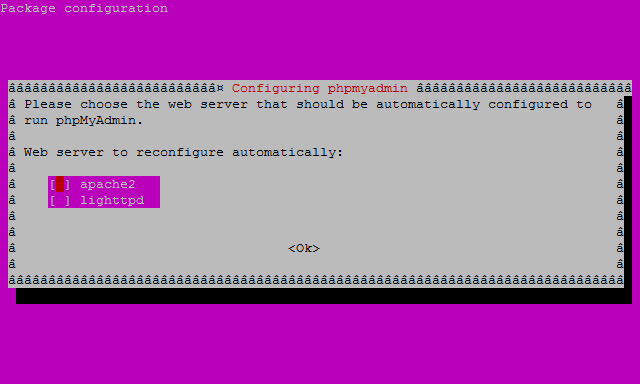
How To Install and Secure phpMyAdmin on Ubuntu 12.04

At the second screen, which asks “configure the database for phpmyadmin with dbconfig-common?”, select Yes , then hit enter to continue.
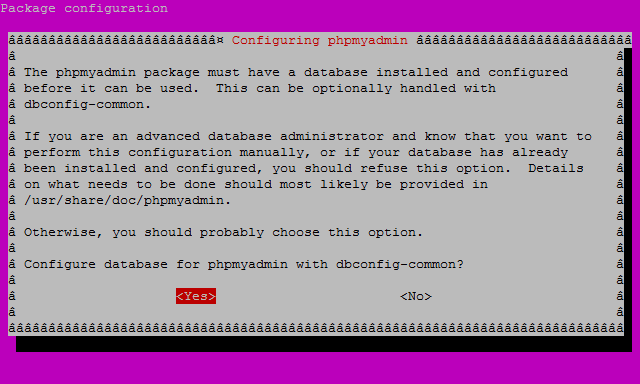
How to Install and Secure phpMyAdmin on Ubuntu 12.04

At the third screen enter your MySQL password, then hit enter to continue.
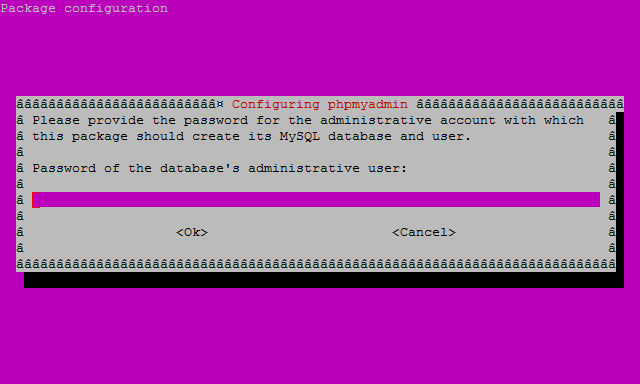
How to Install and Secure phpMyAdmin on Ubuntu 12.04

And finally at the fourth screen set the password you’ll use to log into phpmyadmin, hit enter to continue, and confirm your password.
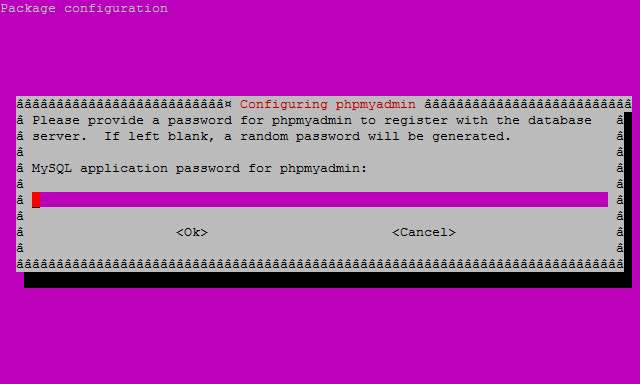
How to Install and Secure phpMyAdmin on Ubuntu 12.04

Step 3: Finish the Configuration of Apache

For a refresher on editing files with vim see: New User Tutorial: Overview of the Vim Text Editor

vim /etc/apache2/apache2.conf

Add the following to the bottom of the file:

# phpMyAdmin Configuration
Include /etc/phpmyadmin/apache.conf

Then exit and save the file with the command :wq .

And, restart Apache 2 with the following command:

service apache2 restart

Verify that phpMyAdmin is working by visiting the_IP_of_your_server/phpmyadmin. For example: http://127.0.0.1/phpmyadmin

Want to Try This Tutorial?

Launch a Free* Storm Server

*For new customers only


Thank you. Your request has been submitted and we’ll be sending you a $75 Storm coupon shortly!

No Comments
Comments to: How to Install and Configure phpMyAdmin on Ubuntu 12.04

Recent Articles

Good Reads

Real-world examples highlight the practical benefits of vehicle tracking system. This case study demonstrates how a medium-sized logistics company in Qatar improved efficiency, reduced costs, and enhanced customer satisfaction through vehicle tracking technology. Company Background The company operated a fleet of 50 delivery vehicles across Doha and surrounding regions. Challenges included delayed deliveries, high fuel […]
Birthstones are a collection of precious gems that have long been associated with the calendar month in which you were born. For generations, wearing your birthstone was believed to bring good luck, protection and positive energy. Birthstones today are valued not only for their symbolism, but also for their beauty; they are the perfect gift to give […]

Worlwide

Overview VipsPM – Project Management Suite is a Powerful web-based Application. VipsPM is a perfect tool to fulfill all your project management needs like managing Projects, Tasks, Defects, Incidents, Timesheets, Meetings, Appointments, Files, Documents, Users, Clients, Departments, ToDos, Project Planning, Holidays and Reports. It has simple yet efficient layout will make managing projects easier than […]
Real-world examples highlight the practical benefits of vehicle tracking system. This case study demonstrates how a medium-sized logistics company in Qatar improved efficiency, reduced costs, and enhanced customer satisfaction through vehicle tracking technology. Company Background The company operated a fleet of 50 delivery vehicles across Doha and surrounding regions. Challenges included delayed deliveries, high fuel […]
Birthstones are a collection of precious gems that have long been associated with the calendar month in which you were born. For generations, wearing your birthstone was believed to bring good luck, protection and positive energy. Birthstones today are valued not only for their symbolism, but also for their beauty; they are the perfect gift to give […]
Valentine’s Day is about expressing love in a way that feels meaningful and long-lasting. As sweet as flowers and chocolates are, they fade. An item like a gemstone ring however lasts forever and encapsulates emotions, symbolism, and beauty all in one. With the right gemstone, a Valentine’s Day gift can become a memory for life. Classic blue to fiery […]

Trending

Turquoise Jewelry is one of the ancient healing stones used for personal adornment and astrological benefits. The rare greenish blue-colored pectolite is celebrated for its enchanting powers among many crystal lovers. It is a hydrated phosphate of copper and aluminum that ranks 5 to 6 on the Mohs hardness scale. It is deemed a protective […]
24 March 2020, the evening when the Government of India ordered a nationwide lockdown for 21 days. Because the deadly Coronavirus crept into the world and turned it into a sinking ship, put unforeseen pressures on all of us with its destructive intentions. Soon after, it turned into a giant monster. Omicron, the new variant […]
Singapore is recognised globally as a prime destination for foreign investors. Its business structure is well-developed, and its tax system is favourable to business owners. The government has a strong support system for entrepreneurs and provides legal protection for intellectual property rights. All of these conditions create an environment that is ideal for Singapore company […]