


 Almost all the video we watch, over digital terrestrial TV, over cable, from satellite, or over the Internet, is compressed. Raw, uncompressed video is just too big and would waste too much bandwidth. Way back before DVD and Blu-ray, there was the Video CD (VCD). It was the first format used to commercially distribute films on standard 120 mm (4.7 inch) optical discs. The video on the discs was encoded in MPEG-1, a lossy compression format designed for streaming video data at 1.5 Mbit/s. Probably the best known component of the MPEG-1 standard was its audio compression format. Officially called MPEG-1 Audio Layer III, you probably know it as MP3.

After MPEG-1 came MPEG-2, which was chosen as the video compression standard for DVD video. It was also used as the underlying video standard for digital satellite (DVB-S) and digital terrestrial TV (DVB-T). MPEG-2 was also ratified by the International Telecommunication Union (ITU) as H.262. After DVD came Blu-ray, which as well as supporting videos encoded in MPEG-2, also supported H.264 or MPEG-4 Part 10, Advanced Video Coding (MPEG-4 AVC) as it was officially known.
- MPEG-1: Used for Video CDs
- MP3: Part of the MPEG-1 standard, ubiquitous today
- MPEG-2/H.262: Used for DVD and other digital mediums
- MPEG-4 Part 10/H.264: Used in Blu-ray
- MPEG-H/H.265: The next generation encoding format with support for 4K and 8K resolutions
After H.264 came H.265. It also has a few other names, most commonly High Efficiency Video Coding (HEVC) or MPEG-H. H.265 doubles the data compression ratio compared to H.264 and can support resolutions up to 8192×4320. This means that video at the same quality needs only half of the bandwidth (or file size). Alternately, it means that the quality of the video can be substantially improved at the same bit rate, something very important for very high definition (i.e. 4K and 8K) displays.

The good news for Linux users is that the H.265 codec is available in the popular encoding suite “ffmpeg.” Although ffmpeg probably exists in your distro’s repositories, it might be out of date or it might not have support for H.265 compiled in. The easiest way to get the latest and most functional version of ffmpeg is to download the statically linked builds.
Download either the 32-bit or 64-bit .tar.xz file. If you are unsure which one to download, then use the 32-bit one. In the directory where you downloaded the file, run the following command to unpack the archive file:
tar xvf ffmpeg-2.4-32bit-static.tar.xz |
Where “ffmpeg-2.4-32bit-static.tar.xz” is the name of the file you downloaded.
This will create a directory called something like “ffmpeg-2.4-32bit-static”. In that directory are the “ffmpeg” and “ffprobe” binaries (along with a couple of other binaries). To encode a video in H.265 format, use the following command:
./ffmpeg -i video.mp4 -c:a copy -c:v libx265 video-h265.mp4 |
The -i parameter specifies the input video file, in this case “video.mp4″. ffmpeg can decode a whole variety of video formats including .avi, .mp4 and .mov.
The -c:a copy parameter tells ffmpeg to copy the audio stream from the original file directly into the output file. While -c:v libx265 tells ffmpeg to encode the new video file in H.265 format.
The last parameter is the desired file name of the H.265 encoded output. ffmpeg can create .mp4, .mov and .mkv files with H.265 encoded video.
Once the encoding has finished, look at the file size of the two videos; you should see a significant decrease in the file size of the H.265 encoded video:
ls video.mp4 video-h265.mp4
|
To check to see that the file has been encoded correctly, use the ffprobe command like this:
ffprobe video-h265.mp4 |
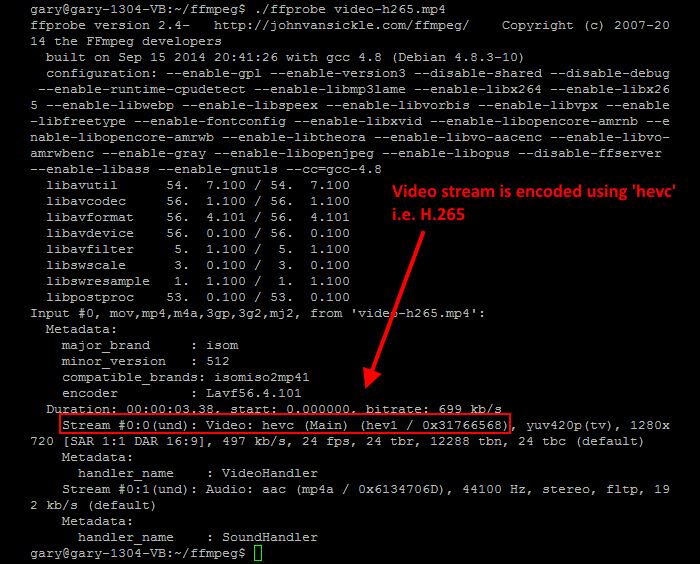
The output will show that the video stream (probably stream#0) is encoded using hvec, i.e. H.265. The audio stream will be encoded in whatever format was used in the original file as it was just copied across from one to the other.
If you have any questions about ffmpeg itself, there is a vibrant community with mailing lists, IRC channels and forums. If you have any questions about the examples given above, please use the comments section below and we will see if we can help.
The post How to Encode H.265 Video Using ffmpeg on Linux appeared first on Make Tech Easier.

























No Comments