


 Google has allowed the Google Voice Android app to grow stagnated, instead working to integrate the service into Hangouts. Now the two forces have come together. Yet with any merger, there are some learning pains. Here’s what Google Voice users need to know in order to access the Voice features they’re used to inside of the new Hangouts app.
Place Calls
Placing Google Voice calls using Hangouts is pretty straightforward, and thankfully so. There’s a new Hangouts Dialer app in the Play Store that you must first install to begin the integration. Though this may look like a separate dedicated app, it merely creates and links to a third tab within the new Hangouts app. Clicking on this icon in your app drawer will fire up the dialer in Hangouts, or you can get here by opening the Hangouts app directly and clicking over to the last tab. If your Hangouts and Google Voice accounts are tied to the same Google account, your number will transition over automatically.
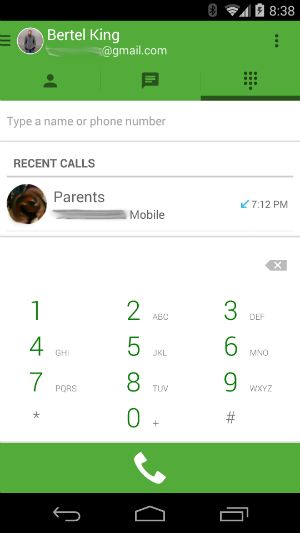
One big new feature this integration brings to the table is the ability to have your phone ring for incoming voice calls. This makes it significantly easier to transition to a VoIP-only format, as you can both send and receive voice calls just as you could using a cellular line.
Send SMS
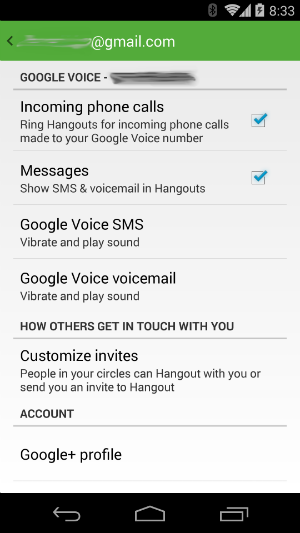
Unlike voice calls, you have to turn on the ability to send text messages manually. A pop-up should appear the first time you launch the new version of Hangouts asking if you want to turn on SMS support for Google Voice. Hit “turn it on.” If for whatever reason this message does not appear, you can also enable the feature by going into the app settings and checking the box next to “Messages: Show SMS & voicemail in Hangouts.”
To actually send a text message, click on the contact you wish to communicate with. The icon in the bottom left corner will let you know if you’re speaking with them via Hangouts or SMS. Click on the icon to toggle between the two.
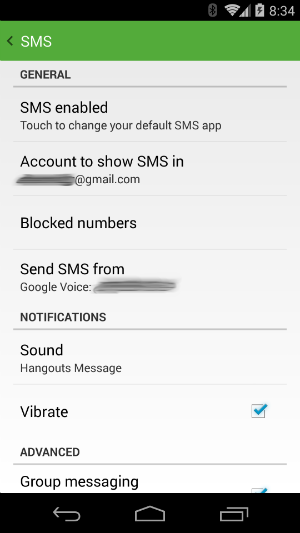
There’s a chance that Hangouts may send out the SMS from your cellular number instead. The app will display “via Google Voice” or “via SMS” to let you know. To change the default behavior, go to the the app’s settings and click on “SMS.” There you will find the option to send out messages from your cellular number, your voice number, or from whichever number your contact reached out to. Choose whichever one works best for you.
Access Voicemail
Like SMS, you have to turn voicemail support on manually. Fortunately, the two features are triggered at the same time, so the process for enabling voicemail is the same as the SMS instructions provided above.
New voicemail recordings will appear under the same tab as chats, and they will be marked by the standard voicemail symbol. Just click on them to play the message.
Conclusion
There are settings present in the Hangouts app for tweaking which actions trigger what sounds and whether your phone should vibrate. The full set of Voice options haven’t transitioned just yet, but for the first integrated release, the basics are covered.
Google Voice users now have the option to handle calls and send out messages from the same app they use to manage instant messages and video chats. Google has been working on this for a while, and so far things seem to have come together nicely.
If you have any questions about the new integration, feel free to ask below.
The post How To Use Google Voice Now That It’s Integrated Into the Hangouts Android App appeared first on Make Tech Easier.































No Comments