


 Recently, I created a rough draft survey form using Microsoft Office Word. However, upon working halfway, I was caught in a dilemma on how to add a check box to each item that will allow the reader to mark them. I heard that the software has this function, but I wasn’t sure where to find it. After a few attempts, I successfully found not just the check box form control, but also custom bullets in the library.
The Microsoft Office Word is packed with quite a number of options in the Ribbon. But for now we’ll focus on the small stuff: the bullets. The default design is a black circular dot. You may also change it into an arrow, diamond or check among other options.
How to add a check box in items and custom bullets
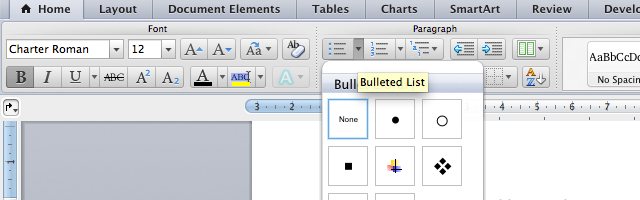
1. Launch your Microsoft Word and click the little arrow beside the bullets.
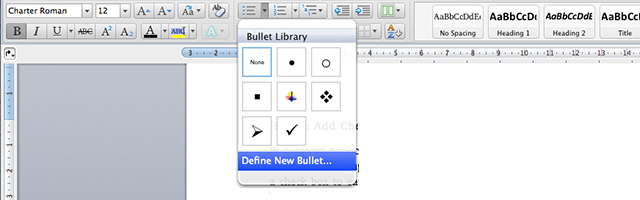
2. The arrow is a drop-down menu of the bullet and document library. Click “Define New Bullet.”
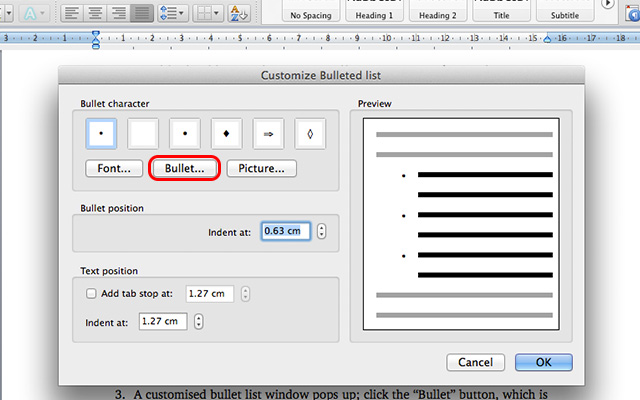
3. A “Customise Bulleted list” window pops up; click the “Bullet” button, which is between the “Font” and “Picture” found on the left side.
4. Once you click the “Bullet”, a pop up “Symbol” window shows up. You’ll see the dot symbol as selected because that’s the default one. Click the “Symbol” button and the font menu is shown.
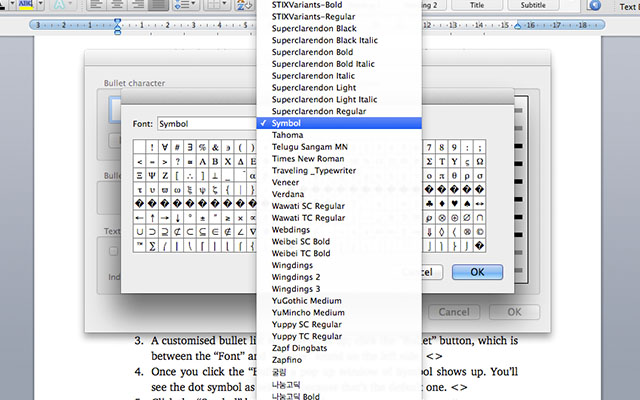
5. Scroll and find the “Wingdings 2″ font, and you’ll see the box below.

6. Choose your desired check box design on the window and click “OK.” You may also check the “Wingdings 1″ and “Wingdings 3″ fonts for more options.
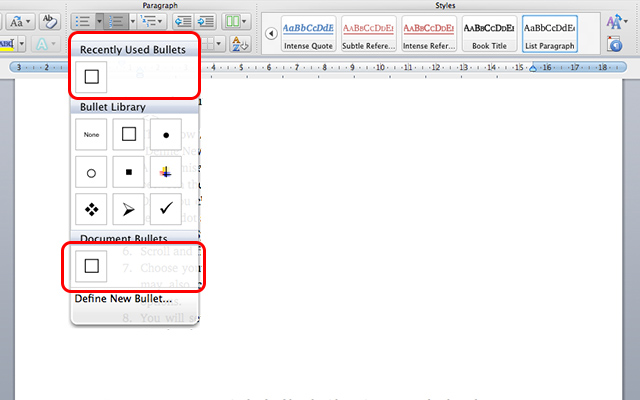
7. You will see the check box in the bullet library just like the default ones. You may add a check box bullet in multiple items.

Note: These check boxes can’t be marked digitally – they’re applicable to printed documents only.
In case you want put a single check box beside an item, go to the drop down menu under “Recent Used Bullets,” and choose the check box.
It is also possible to put content control on the check boxes, but you have to activate the Developers tab, and there’s a caveat, too.
How to add check box with content control
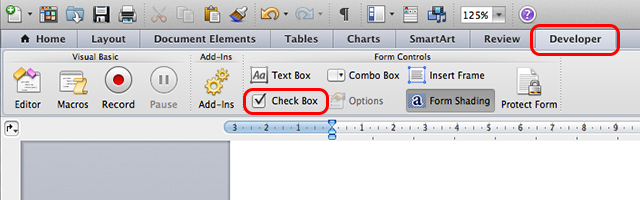
To activate the “Developers” tab and integrate the content control for the check boxes, we must navigate the Microsoft Office Word settings.
For Windows users: click any place in the Word pane and choose “Customise The Ribbon.” You’ll see the “Developer” option; click and then click “OK.”
For OS X users: Go to “Preferences -> Ribbon” and check the “Developer” option.
Conclusion
Whether you’re Windows or Mac OS X users, the “Check Box” will appear in the Ribbon. However, the caveat is that you can’t add a check box in multiple items like how you add default bullets. It requires you to manually add a check box in a to-do list or survey, which is quite a tedious task (copy and paste) – a function that won’t make your tech life easier – but it works.

To mark it, right click the box and choose “Properties” and change the Default value into “Checked.”

Let me know how it works for you.
The post How to Add a Check Box and Custom Bullets in Microsoft Word appeared first on Make Tech Easier.



























No Comments