


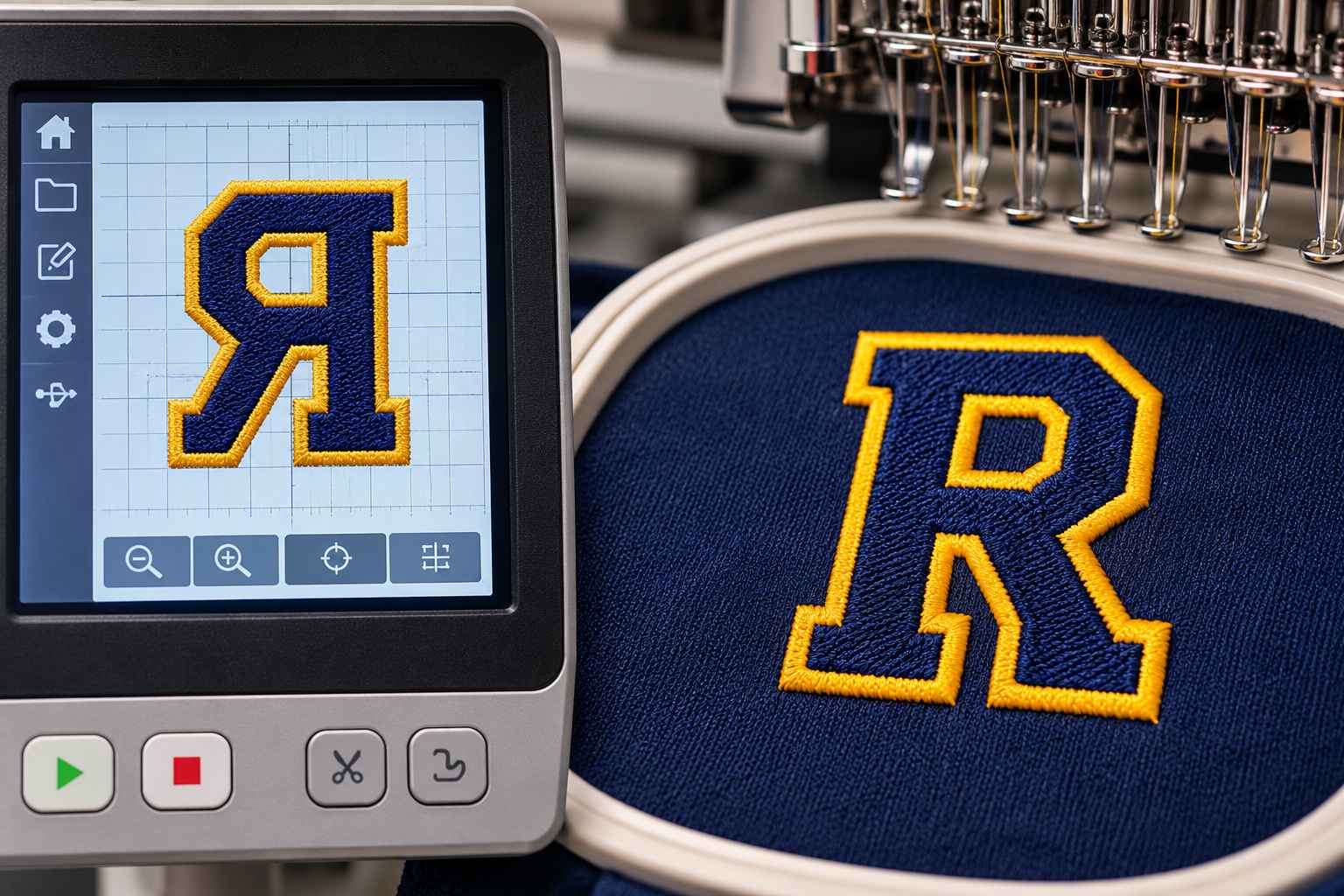
An embroidery design may appear mirrored because a horizontal mirror setting is active, the design was reflected in digitizing software, or its orientation changed during preparation, export, or transfer. However, an unusual machine preview does not always prove that the stitches will sew backward. Some displays present the design relative to the hoop or machine, while garment positioning can also confuse the expected view. Before changing the file, compare the preview with the original artwork, inspect the machine and software settings, confirm hoop orientation, and test the design under controlled conditions. The steps below help locate and correct the actual source.
Key Takeaways
- A mirrored preview does not automatically mean the stitch file is defective.
- Horizontal mirroring and 180-degree rotation produce different results.
- Text, numbers, and asymmetric shapes reveal orientation errors quickly.
- Check the exported file, machine settings, hoop, and garment before editing.
- Test a corrected design before starting production.
Does a Mirrored Preview Mean the Design Will Stitch Backward?
Not necessarily. Determine whether the embroidery design is mirrored only on the display or whether its stitch data has been reflected. Machine screens differ in viewpoint and editing behavior. A model may show the design relative to the hoop, operator, or another reference described in its manual.
Use readable lettering or an asymmetric detail as the reference. Review any available simulation or trace, but do not alter the file until orientation is verified.
Why Can an Embroidery Design Appear Mirrored?
|
Possible source |
What to inspect |
|
Machine setting |
Mirror or flip control enabled after loading |
|
Digitizing software |
Objects or complete design reflected before export |
|
Exported file |
Orientation changed or wrong version selected |
|
File transfer |
Outdated or previously corrected file loaded |
|
Hoop or garment |
Item mounted in an unexpected direction |
|
Display convention |
Preview shown from a machine-specific viewpoint |
These are possible causes rather than universal explanations. DST, PES, EXP, and JEF files do not inherently reverse embroidery. Evaluate the exported stitches, receiving machine, and transfer workflow.
How Can You Identify the Source of the Mirroring?
- Check the artwork. Confirm how text, symbols, and asymmetric details should face.
- Inspect the preview. Decide whether the design is mirrored, upside down, or viewed from another direction.
- Review machine edits. Check mirror, flip, and rotation controls using the model’s manual.
- Reopen the export. Compare the exact machine file with the editable master.
- Verify the version. Match its filename, date, dimensions, colors, and production notes.
- Check the hoop. Confirm the garment top, placement mark, and attachment direction.
- Run a sample. Stitch recognizable text or the design on suitable test material.
Record where the change first appears. A reversed export points to file preparation. Correct files with a changed machine preview point toward machine edits or display conventions.
How Do You Fix a Mirrored Embroidery Design?
If a machine mirror command is active unintentionally, disable it and reload or reset the design as required. Menu names differ, so follow the machine manual. If the exported file is already reflected, correct the editable source, export a new file, and assign a clear version name.
Reopen the output and compare text, asymmetric details, dimensions, and color order with the artwork. Transfer it, inspect the preview, and stitch a sample. Avoid mirroring at both the software and machine stages because two changes can hide the cause.
What Is the Difference Between Mirroring and Rotating?
A horizontal mirror swaps left and right, making normal lettering appear backward. A vertical mirror swaps top and bottom. Rotation turns the design around a point without reversing its handedness. A 180-degree rotation may correct an upside-down placement, but it cannot correct a left-to-right reflection.
Identify the change before selecting a tool. Words, numbers, and one-sided details reveal it more clearly than symmetrical artwork.
Can Exporting or Converting a File Cause Reversal?
Check conversion when the editable design is correct but the machine file is not. An accidental mirror command, orientation option, or wrong source version may enter the output. Reopen the exported file rather than judging only the artwork.
Do not blame the extension automatically. Machine formats store production stitch information and may not retain editable objects. Keep the master, export for the receiving machine, and avoid repeated conversions when the source is available.
How Should a Shop Troubleshoot a Reversed Left-Chest Logo?
Suppose a company logo is correct in approved artwork but reversed on the machine before polo production. The operator should compare recognizable details, check for an active mirror edit, reopen the exact export, and verify the garment top and hoop direction. If uncertainty remains, the operator should stitch comparable sample material.
This sequence avoids flipping a file that may already be correct and shows whether the change began during preparation, export, transfer, machine editing, or physical setup.
How Can Mirrored Embroidery Be Prevented in Production?
- Approve artwork with a clear top direction and readable text.
- Review the editable design before export.
- Reopen the final machine file.
- Name files by garment, placement, size, and revision.
- Mark the garment top and hoop direction.
- Check mirror and rotation settings.
- Test new or revised designs before production.
Use the same approval process for uniforms, caps, patches, jacket backs, and workwear. An orientation check can prevent a reversed logo across an order. Record the approval date and operator.
When Is Professional File Preparation Useful?
Professional support helps when artwork and machine output disagree, lettering remains backward after settings are checked, or multiple machines show different results. Experienced embroidery digitizing services can review the artwork, editable design, dimensions, placement, orientation, and requested format together.
Provide the artwork, source design, export, machine model, hoop details, garment direction, and preview or sample photographs. This evidence helps separate a file problem from an operator or machine-setting issue.
Final Production Guidance
Treat a mirrored display as a troubleshooting signal rather than proof that the digitizing is wrong. Compare the artwork, editable source, exported file, machine settings, and hoop orientation in order. Correct the stage where reversal first appears, then reopen the output and test representative material. This process separates reflection from rotation and prevents repeated corrections from creating another error. If the source remains unclear, preserve each version and provide the production details for technical review before stitching garments.

